NumPy
- NumPy really defines the core of the Python scientific computing data stack.
- Short for Numerical Python, it is one of the most important foundational packages for numerical computing in Python.
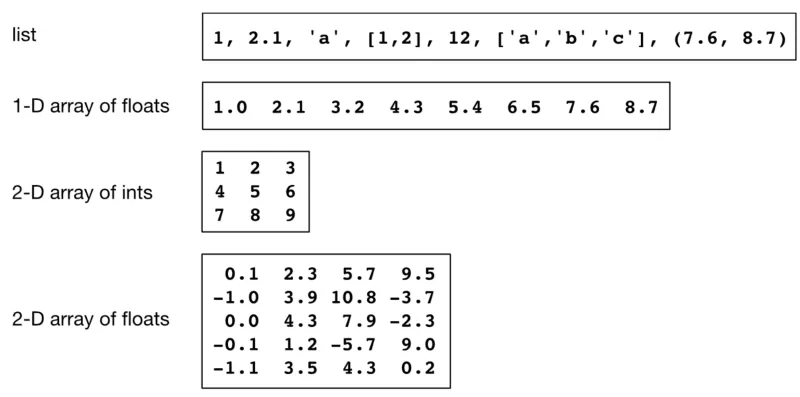
- Useful for working with arrays, which are data structures that store values of the same data type in multiple dimensions.
- Therefore NumPy Arrays are homogeneous, multidimensional and are similar in some ways to Python lists.
- Much of the knowledge about NumPy is transferable to pandas as well.
- For more information, visit the NumPy website.
The Structure of NumPy Arrays:
- Can’t have different types of data in a NumPy array.
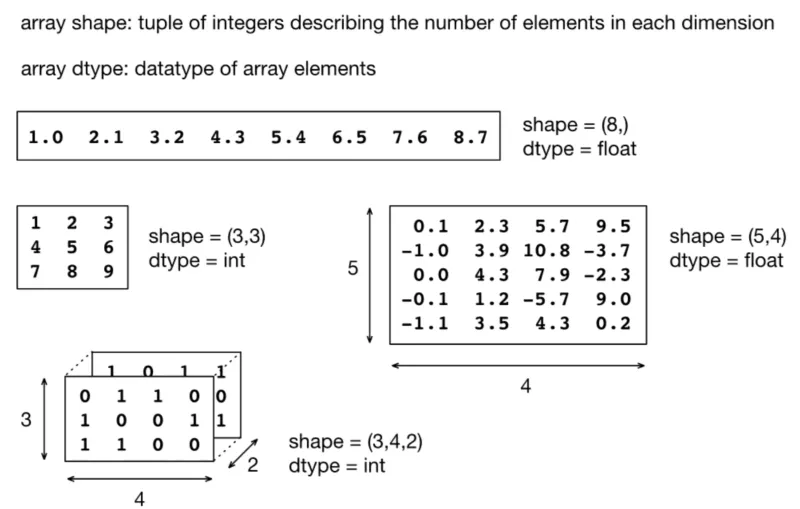
- Array shape: describes how many elements in each dimension.
- A 1D array shape like (8,) simply means eight elements in a single dimension. There is no distinction between rows and columns in 1D NumPy array.
- A 2D NumPy array has shape (rows, columns).
- Array dtype: datatype of array elements.
-
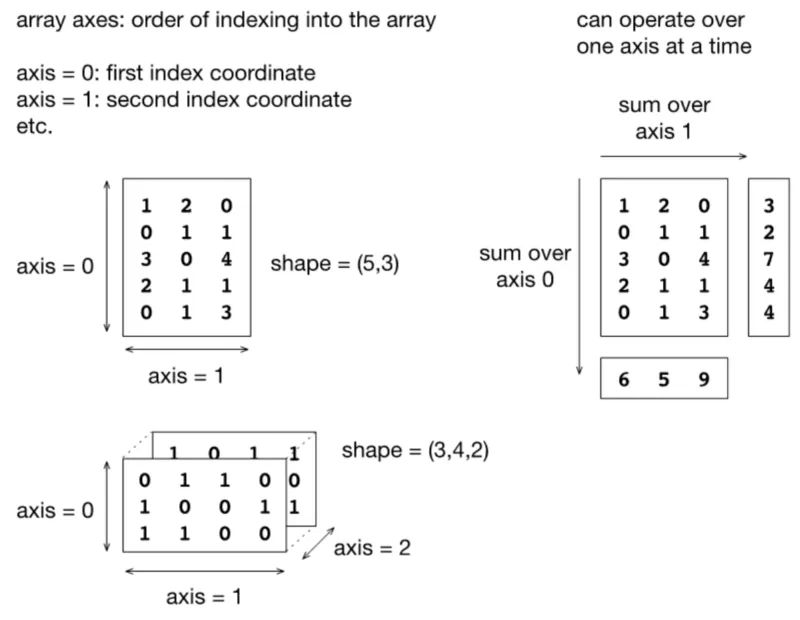
Array axes: order of indexing into the array.
- Axis 0: moves down the rows (i.e., it moves between rows, operating vertically).
- Axis 1: moves across the columns (i.e., it moves between columns, operating horizontally).
-
The mental trick: the axis number tells you which axis shrinks/disappears in the result of a reduction operation (e.g., summing along an axis)
Axis = 0→ the row dimension collapses → you get one result per columnAxis = 1→ the column dimension collapses → you get one result per row
Creating a NumPy Array:
- You can create a NumPy array from the data in one or more Python lists.
- Suppose you have a list for each employee at a company containing that employee’s base salary payments over the past three months.
python
1import numpy as np
2jeff_salary = [2700, 3000, 3000]
3nick_salary = [2600, 2800, 2800]
4tom_salary = [2300, 2500, 2500]
5base_salary = np.array([jeff_salary, nick_salary, tom_salary])
6print(base_salary)- Start by importing the NumPy library on line 1. Then define a set of lists, where each list contains the base salary data of an employee over the past three months. Finally, we combine these lists into a 2D NumPy array.
Output:
1[[2700 3000 3000]
2 [2600 2800 2800]
3 [2300 2500 2500]]- The 2D array has two axes, which are indexed by integers, starting with 0.
- Axis 0 runs vertically downward across the array’s rows, while axis 1 runs horizontally across the columns.
Performing Element-Wise Operations:
- It’s easy to perform element-wise operations on multiple NumPy arrays of the same dimensions.
- For example, let’s follow the same process to create an array containing the employees’ monthly bonuses:
python
1jeff_bonus = [500, 400, 400]
2nick_bonus = [600, 300, 400]
3tom_bonus = [200, 500, 400]
4bonus = np.array([jeff_bonus, nick_bonus, tom_bonus])- We can add the base salary and bonus arrays together to determine the total amount paid each month to each employee:
python
1salary_bonus = base_salary + bonus
2print(type(salary_bonus))
3print(salary_bonus)
Output:
1<class 'numpy.ndarray'>
2[[3200 3400 3400]
3 [3200 3100 3200]
4 [2500 3000 2900]]
Using NumPy Statistical Functions:
- NumPy’s statistical functions allow you to analyze the contents of an array.
- For example, you can find the maximum value of an entire array or the maximum value of an array along a given axis.
- Let’s imagine you want to find the maximum value in the salary_bonus array. We can do this with the NumPy array’s max() function:
python
1print(salary_bonus.max())Output:
13400- We can also find the maximum value of an array along a given axis.
- For example, if you want to determine the maximum amount paid to each employee in the past three months, you can use NumPy’s amax() function:
python
1print(np.amax(salary_bonus, axis=1))- By specifying axis=1, we instruct amax() to search horizontally across the columns for a maximum in the salary bonus array, thus applying the function across each row.
Output:
1[3400 3200 3000]- For the entire list of statistical functions supported by NumPy, visit the NumPy documentation.